How to prepare for a job interview with ChatGPT, Claude or Gemini: guide and prompts

Yes, you can use ChatGPT, Claude or Gemini to prepare for a job interview. Use them to organize the information you provide, generate hypotheses about questions you might be asked, improve drafts of your own answers and find gaps you should practice with more intention. But do not use them to tell you what to say or to predict how the interview will go, because that kind of practice can work against you.
The method in this guide works with any general-purpose AI tool and starts with:
- A job posting and a short summary of your background.
- Prompts by phase. The process is divided into 8 phases.
- A review of every output.
- 2 or 3 follow-up questions as a basic stress test.
You should also switch methods if what you need is realistic out-loud practice or more consistent feedback that helps you spot the patterns weakening your application and decide how to improve them. ChatGPT, Claude, or Gemini can help when you already have a reasonably clear idea of what you need to prepare, but they are not enough if you need truly guided, expert practice. For that, you can use a voice-based mock interview simulator.
If you have not yet clarified the job posting, your professional examples and the fit signals you want to show, it is probably better to start with how to prepare for a job interview without memorizing answers and then come back to ChatGPT as tactical support.
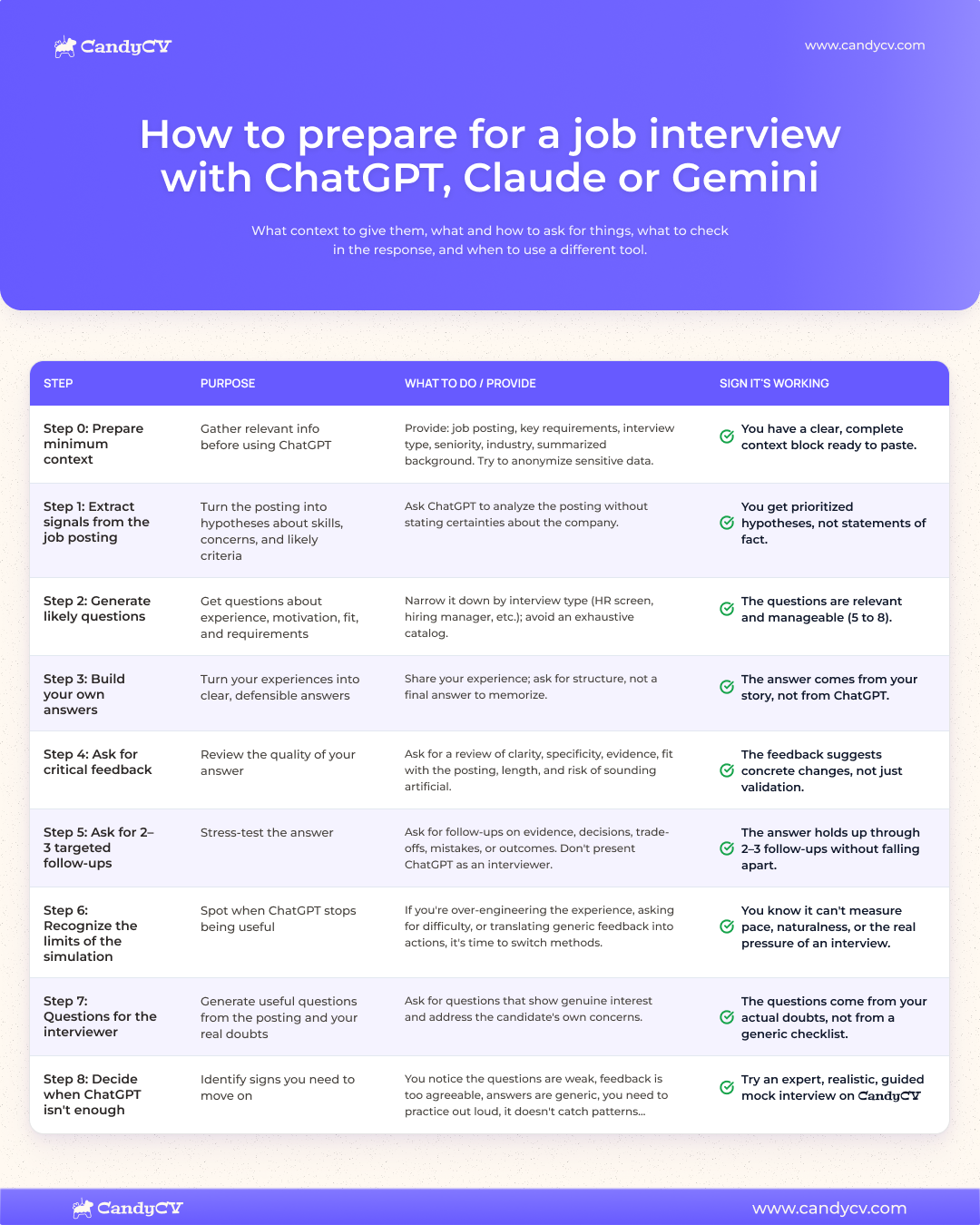
Summary of the recommended way to use ChatGPT, Claude or Gemini for job interviews
| Step | What you ask ChatGPT for | What you need to review yourself |
|---|---|---|
| 1. Context | Work from a job posting, a role and a short background summary. | Check that key requirements and basic details about the interview type and interviewer are not missing. |
| 2. Hypotheses | Turn the job posting into possible themes and questions. | Check that it does not present those questions as certainties about the company. |
| 3. Answers | Organize real experiences into defensible answers. | Check that it does not invent achievements, metrics, decisions or responsibilities. |
| 4. Feedback | Critique clarity, evidence, fit and length. | Check that it suggests specific changes, not just “this sounds good.” |
| 5. Follow-ups | Ask 2 or 3 follow-up questions to stress-test an answer. | Do not confuse that check with a realistic interview. |
You can jump straight to the full prompt matrix, but first I want to make one thing clear: you do not need to find “the perfect prompt.” You need to avoid getting an answer from ChatGPT, or whichever general-purpose AI tool you use, that looks correct but is generic, not really yours or difficult to defend in conversation.
That limit matters because ChatGPT, Claude or Gemini can sound confident while being wrong, and they can give you superficial or overly agreeable feedback. OpenAI says this in its own documentation on reliability: ChatGPT can generate incorrect or misleading answers, so it is better to use it as drafting support, not as a final source. Guidance such as the University of Manchester page on using AI for interview practice also treats AI as a support tool for preparing, practicing or generating questions, not as a substitute for your judgment, experience or voice.
What ChatGPT, Claude or Gemini can and cannot do when preparing for an interview
The useful way to use general-purpose AI for interview preparation is to give it specific tasks, not to treat it as the interview itself: generating hypotheses, organizing ideas, reviewing answers and asking basic follow-up questions about the context you have provided. I strongly advise against turning it into “the interviewer” or delegating what you should say.
Used well, it can reduce improvisation. Used badly, it gives you polished answers that prove nothing or questions so generic they do not help you prioritize.
| It can help you… | It is not a good tool for… |
|---|---|
| Extract signals from a job posting: requirements, skills, open questions and likely evaluation focus areas. | Stating exactly what the company will ask. |
| Generate possible questions based on the role and your profile. | Creating an endless question bank with no prioritization. |
| Organize real experiences into a clearer answer. | Inventing achievements, results, projects or responsibilities. |
| Spot whether an answer is too long, vague or not specific enough. | Deciding whether the answer will convince an interviewer. |
| Ask 2 or 3 follow-up questions to check whether an answer holds up. | Reliably simulating pace, pressure, listening, nerves or naturalness. |
| Prepare questions to ask the interviewer from questions you actually have. | Manufacturing artificial interest in a company or role. |
The UK Civil Service, for example, allows candidates to use AI to prepare for interviews or generate practice questions, but sets a limit: it should not be used to invent experiences or produce answers during an assessment.
A useful rule is this: an answer works if you can explain where each example comes from, what you did, what decision you made, what the outcome was and what you learned.
What context to give ChatGPT, Claude or Gemini before asking for prompts, with examples
The vaguer the input, the more generic the answer. Before asking for prompts, prepare a minimum context: role, requirements, level, interview type and a short version of your background.
Think of ChatGPT or similar tools as someone who does not know your process, your industry or your experience. If you only say, “I have a marketing interview, give me questions,” it will usually return broad questions. If you explain the type of role, what the job posting asks for, what experience you can defend and what worries you, it can help you prioritize better.
| Useful input | You do not need to include |
|---|---|
| Summary of the job posting or role: mission, responsibilities and key requirements. | The full posting if it contains confidential, internal or irrelevant information. |
| Approximate level: entry-level, mid-level, senior, manager, director, internship, career change. | Inflated labels if they do not actually change the type of interview. |
| Industry, company type and role context, if known. | Deep company research if you have not verified it yet. |
| Interview type: first call, technical, hiring manager, panel, case, culture fit, if you know. | Assumptions presented as facts. If you do not know, say that. |
| Background summary: 3-5 experiences, projects or achievements you can defend. | Your full resume with personal data, phone number, address, ID numbers or sensitive information. |
| Practice objective: organize examples, prepare likely questions, improve one answer, ask for follow-ups. | A generic request like “prepare me for the interview” with no specific task. |
| Answer constraints: length, natural tone, language, level of detail and format. | Stock phrases meant to make you sound more confident if they do not reflect how you would speak. |
A good starting context could look like this, without identifiable data:
“I’m preparing for an interview for a senior product manager role at a B2B SaaS company. The job posting emphasizes discovery, prioritization, coordination with engineering and adoption metrics. My most relevant experience: I led an onboarding redesign, coordinated a cross-functional team and took part in user interviews. I want to prepare likely questions and identify which examples I should develop more. Do not invent information: if something important is missing, ask me before assuming it.”
Notice two details. First, the context does not ask for final answers. It asks for questions, criteria and gaps. Second, it gives AI a boundary: if information is missing, it should ask instead of filling it in. That instruction reduces the risk of receiving a confident answer built on assumptions.
This is similar to the process of creating a resume with ChatGPT without sounding generic and then using an expanded version of that background as input for the interview.
Prompt matrix to prepare for a job interview with ChatGPT, Claude or Gemini
Use different prompts for different tasks. The matrix works best if you already have a specific job posting or, at minimum, a role that would genuinely fit you as a reference point. If you only have a general idea of the role, the questions can still warm you up, but they will be less precise.
| Phase | Editable base prompt | Input needed | What to review | Warning sign | Next step |
|---|---|---|---|---|---|
| 0. Prepare context | “I’m preparing for an interview for [role]. Work only with the information I give you. If something important is missing, ask me before assuming it.” | Job posting summary, key requirements, level, interview type if known and 3-5 defensible experiences. | Whether the context is enough to work with, without including unnecessary personal, sensitive or confidential data. | The AI fills gaps without warning or turns assumptions into facts. | Adjust the context before asking for questions or answers. |
| 1. Extract signals from the job posting | “Analyze this job posting and extract the signals that are likely to matter in the interview: responsibilities, skills, role risks, fit criteria and questions interviewers may explore.” | Text or summary of the job posting and, if available, verified public information about the role or team. | Whether the signals come from the posting, not from a generic interview template. | It returns broad skills like “communication” or “leadership” without connecting them to specific responsibilities. | Turn those signals into likely questions. |
| 2. Generate likely questions | “Using these signals and my background summary, suggest likely interview questions. Group them by theme and mark which ones I should prioritize. Treat them as hypotheses, not certainties.” | Job posting signals, background summary and interview type if known. | Whether there are useful categories: experience, motivation, fit, critical requirements, decisions and possible profile concerns. | The list is too long, repetitive or claims to know what the company will ask. | Choose 5-7 priority questions and gather material to answer them. |
| 3. Build your own answers | “Help me structure this real experience to answer [question]. Do not invent data. Point out what is missing for the answer to be defensible.” | Question, real experience, your own action, outcome or learning and connection to the job posting. | Whether the answer keeps your voice, includes evidence and does not turn a weak experience into an exaggerated achievement. | The answer sounds flawless, but you cannot explain where each claim comes from. | Rewrite it in your own words and run it through critical feedback. |
| 4. Ask for critical feedback | “Review this answer as a draft. Evaluate clarity, specificity, evidence, length, fit with the job posting and naturalness. Give me 3 prioritized improvements.” | Written answer, the question it tries to answer and role context. | Whether the feedback gives specific changes: what to cut, what to add, what to explain better and what sounds generic. | It only says “this is good,” “it sounds professional” or rewrites it with nicer phrases without improving the substance. | Apply concrete changes and check whether the answer still sounds like you. |
| 5. Ask 2-3 follow-up questions | “Ask me 2 or 3 follow-up questions about this answer to check whether it holds up. Focus on evidence, decisions, trade-offs, mistakes, outcomes or learnings.” | Revised answer and the points you want to defend. | Whether the follow-ups find real gaps or are only obvious and friendly. | You confuse handling 2 written follow-ups with having practiced a real interview. | Strengthen the answer or move to more designed practice if you need pressure, pace or consistent feedback. |
| 6. Notice when the simulation breaks | “Use this conversation history to point out signs that the exercise is becoming artificial: too many instructions about role, difficulty, follow-ups, evaluation or improvement plan. Do not present this as a final diagnosis.” | Short history of what you asked, answers you received and questions you still have. | Whether ChatGPT, Claude or Gemini is helping you move forward or whether you are just iterating text instead of practicing conversation. | You have to ask for everything: role, difficulty, follow-ups, evaluation, improvement plan and prioritization criteria. | Stop iterating and switch methods if the real issue is out-loud practice or diagnosis. |
| 7. Prepare questions for the interviewer | “Using this job posting and the questions I actually have, help me write 3-5 questions to ask the interviewer. Avoid questions designed only to impress.” | Job posting, real questions about the role and points you need to clarify before deciding. | Whether the questions help you understand the role, expectations, team, priorities or ways of working. | The AI manufactures artificial interest or suggests questions you do not actually care about. | Keep only a few useful questions and adapt them to how you speak. |
| 8. Decide whether ChatGPT is enough | “Help me organize the signals so I can decide whether to keep using ChatGPT or switch methods. Distinguish between lack of context, lack of evidence, need for out-loud practice and need for external feedback. Do not make the decision for me.” | Priority questions, revised answers, feedback received and symptoms of being stuck. | Whether you need more context, more evidence, out-loud practice, external feedback or a more guided experience. | ChatGPT, Claude or Gemini keeps returning similar variations and you still do not know what to fix first. | Choose the next method: prepare the base, strengthen evidence, practice out loud or ask for more specific feedback. |
Do not try to use every phase in one conversation if that forces you to accept superficial answers. It is better to work on one phase, review the output and decide whether it is worth moving to the next one. The sign of good use is not having many generated answers. It is having a few answers of your own that you can defend.
How to ask general-purpose AI to turn a job posting into likely interviewer questions, with prompts and examples
ChatGPT can help you move from a job posting to a list of likely interview questions, but those questions are hypotheses. It does not know what the company will ask, it does not know the interviewer’s internal criteria and it should not present an inference as certainty.
The useful request is not “give me questions for a marketing interview.” Ask it to reason from visible signals in the job posting:
“Analyze this job posting for a [position/role]. First extract the signals that could be evaluated in the interview: responsibilities, critical requirements, technical skills, transferable skills, role risks and reasonable questions about my profile. Then suggest likely questions grouped by theme. For each question, indicate which signal in the posting supports it and what I should prepare to answer it. Do not say the company will ask these questions: treat them as hypotheses.”
The important part is asking for three things: signal, question and preparation material. If ChatGPT only gives you a list of questions, it leaves you almost where you started. If it explains which part of the job posting each question comes from, you can decide which ones make sense and which ones are filler.
To be useful, it should help you organize questions into categories like these:
- Relevant experience: which projects, decisions or responsibilities best connect with the role.
- Critical requirements: which parts of the posting look essential and should be demonstrable.
- Motivation and fit: why this role, this company or this professional move interests you without sounding like a stock phrase.
- Ways of working: collaboration, autonomy, prioritization, stakeholder management, pressure or learning.
- Profile questions or risks: career changes, level jumps, gaps, limited experience with a requirement or being overqualified for the role.
Then do not prepare twenty questions. Ask the general-purpose AI tool you use to prioritize 5 to 7 and explain the priority:
“From this list, choose the 5-7 questions I should prepare first for this interview. Prioritize the ones with the clearest connection to the job posting signals, the highest impact if I do not prepare them and the highest risk that my answer will sound generic. For each one, tell me what evidence or example I should look for in my background.”
If a question appears because the job posting requires stakeholder management, it makes sense to prepare an example of coordination, conflict or prioritization. If a generic question about “strengths and weaknesses” appears without a connection to anything visible, it can work as basic practice, but it should not become the center of your preparation.
Once you have that shorter list, use each question to choose one of your own experiences and turn it into a defensible answer.
How to use ChatGPT, Claude or Gemini to turn your experience into defensible answers
A defensible answer is one you can explain: what happened, what you did, what decisions you made, what outcome or learning came out of it and why it fits the job posting.
ChatGPT and similar tools can help you organize an experience, cut what is unnecessary and spot gaps. But you should not use them to manufacture achievements, turn a secondary contribution into leadership or write a final answer to memorize.
A useful prompt for this phase would be:
“I want to prepare an answer to this question: [interview question]. This is an experience I can defend: [brief context, what I did, who I worked with, what decision I made, outcome or learning]. Help me structure it clearly for a [role] interview. Use STAR only if it fits, do not invent data, mark what information is missing and avoid phrases that sound generic or too perfect. If something cannot be supported with the information I give you, say that instead of completing it.”
STAR can be useful as a frame (situation, task, action and result) but it is not magic. An answer can follow that structure and still be weak if your own action is unclear, the result is inflated or the learning has no relationship to the role.
Review the output with this filter:
| Criterion | Control question | Risk signal |
|---|---|---|
| Experience | Did this really happen, and can I explain it with details? | The answer depends on broad phrases like “I led,” “I improved” or “I managed” without explaining how. |
| Own action | Is it clear what I did, not just what the team did? | ChatGPT assigns you responsibility you did not have or erases other people from the context. |
| Evidence | Is there a defensible example, decision, data point, outcome or learning? | The answer lists skills but shows no concrete proof. |
| Fit with the job posting | Does the answer connect with a visible need in the role? | It sounds like an answer that could be used in any interview. |
| Natural voice | Could I say this out loud without sounding AI-generated? | It uses words, tone or confidence that do not fit you. |
| Limit | Do I know what I am not claiming? | It turns a partial contribution into an absolute success. |
This filter reduces a common risk when using AI without review: asking it to “improve” an answer and accepting a version that sounds more professional but less like you. If the draft says “I demonstrated strategic leadership in a complex environment” and what you actually did was coordinate a small part of a project, the style improvement is making your interview answer worse. Follow-up questions can expose that gap, and then your answers lose credibility.
It is better to ask for a more specific version, even if it is less impressive:
“Rewrite the answer in a natural tone. Do not exaggerate my responsibility. Make clear what I did, what the team did and what evidence I can mention without inventing metrics.”
Then adapt the result to how you speak. ChatGPT, Claude, and Gemini can give answers tidy endings, but you need an answer you can hold in conversation.
If this exercise shows that your answers only list skills (“I’m resourceful,” “I communicate well,” “I work well under pressure”) and you cannot find proof, the problem is no longer ChatGPT. You need to work on how to demonstrate skills in an interview with evidence before polishing more sentences. Talking about skills without proof is one of the most common job interview mistakes that weaken your fit signal.
And if the blocker is a particularly difficult question (for example, a complicated departure, a gap, limited experience or salary expectations) do not try to solve it only with a nicely worded answer. In those cases, it helps to separate difficult interview questions and what they may assess first, and then use ChatGPT, Claude or Gemini to organize your draft.
How to ask general-purpose AI for critical feedback on your interview answers
Feedback from ChatGPT, Claude or Gemini is useful if it helps you decide what to change. If it only validates the answer, makes it prettier or returns a more polished version without explaining the problem, it is not enough.
Ask for feedback with concrete criteria and a limited output. If you say “improve this answer,” it will probably rewrite it, but in interview-quality terms it may not improve much. If you ask it to review clarity, specificity, evidence, length, fit and naturalness, it is more likely to point out useful problems.
Try this prompt:
“Review this answer as a draft for a [role] interview. Do not assume it is good. Evaluate: clarity, specificity, evidence, length, fit with the job posting and naturalness. Return: 1) a brief verdict, 2) the 3 most important problems in priority order, 3) the specific phrase or part you would change, 4) what information I need to add, and 5) an adjusted version only after explaining the changes. If you do not have enough context, ask me first.”
The important part is “in priority order.” Without priority, ChatGPT, Claude or Gemini can give you ten small improvements and no decision. You need to know what to fix first: lack of evidence, too much length, generic phrasing, weak connection to the job posting or a tone that sounds artificial.
Use this checklist to separate useful feedback from decorative feedback:
| Useful feedback | Useless feedback |
|---|---|
| Points to a specific part of the answer and explains why it fails. | Says “the answer is well structured” without justifying it. |
| Prioritizes 2 or 3 changes. | Lists generic improvements with no order or impact. |
| Distinguishes between a substance problem and a style problem. | Only changes words to make the answer sound more professional. |
| Asks for missing information before filling gaps. | Fills in assumptions about outcomes, metrics or responsibilities. |
| Spots phrases any candidate could say. | Adds even broader phrases: “results-oriented,” “proactive,” “highly adaptable.” |
| Leaves you with a clear action: cut, specify, add evidence or adjust to the job posting. | Ends with a prettier version, but you do not know what you learned or what to practice. |
You can also ask it to be explicitly critical, but in a controlled way:
“Do not try to make me feel good. Point out which part of this answer could sound generic, exaggerated or not credible to an interviewer. Do not invent objections: base the critique on the text and the job posting.”
A good sign is feedback that forces you to do something concrete. For example:
- Cut a two-minute answer into a more direct version.
- Replace “I was responsible for improving the process” with which part of the process you touched and how.
- Add a difficult decision you made, not just the outcome.
- Change a phrase that sounds too formal into one you would actually say out loud.
- Acknowledge a limit or learning instead of presenting everything as a perfect success.
A bad sign is that, after the feedback, the answer looks better written but you cannot defend it better. That usually means ChatGPT and similar tools worked on the wrapper, not the substance.
How to use ChatGPT, Claude or Gemini to stress-test answers without pretending it is a real interview
Once you have an answer of your own, these tools can help you check how well you can defend the details. Ask for 2 or 3 follow-up questions and you will see whether your example holds up. This helps you find obvious gaps before moving to more oral practice that feels more like a conversation (something general-purpose AI cannot simulate with enough quality).
The difference matters because a written answer can sound clear after you have had time to organize and edit it. But in an interview, you need to listen, choose which part of your experience fits, answer without reading and handle a follow-up question in a matter of seconds. ChatGPT, Claude, and Gemini can test one part of that process, but they do not reproduce the full environment well.
Ask 2 or 3 follow-up questions to check whether your answer holds up
Ask for a few focused follow-up questions. The goal is not to have ChatGPT interrogate you. The goal is to check whether your answer has enough substance when someone asks for specifics.
You can use this prompt:
“I’m going to paste an interview answer. Ask me only 2 or 3 follow-up questions to check whether it holds up. Focus on evidence, decisions, trade-offs, mistakes, outcomes or learnings. Do not try to run a full simulation. If my answer is vague, ask me for a concrete example. If it sounds exaggerated, ask what I specifically did. If the outcome is missing, ask how I know it worked.”
After answering, review two things:
- Whether you were able to answer without inventing.
- Whether the questions touched important points.
A useful follow-up usually asks for something observable: a decision, a data point, a responsibility, a discarded alternative, a difficulty or a learning.
| If the follow-up asks about… | Check whether you can explain… |
|---|---|
| Evidence | What fact, example or outcome supports what you say. |
| Own action | What you did and what other people did. |
| Decision | Why you chose one option and what alternative existed. |
| Trade-off | What cost, risk or compromise your decision involved. |
| Mistake or limit | What did not go well and what you learned. |
| Outcome | What changed afterward and how you know, even without a perfect metric. |
If you cannot answer, that is fine: you have found an area that needs work. Go back to the experience, add context or soften the claim.
Do not use general-purpose AI to measure pace, naturalness or real interview pressure
You can read an answer out loud and notice whether it is too long, robotic or hard to say. That is useful. What you should not do is ask ChatGPT to reliably measure your pace, naturalness, nerves, listening or ability to adapt to a real conversation.
In a written chat, you control too much of the environment. You can pause, edit, delete, rephrase and ask for another version. Even if you use voice, you still have to design the experience: give it the role, adjust difficulty, request follow-up questions, decide whether the feedback is valid and turn that feedback into actions. That load takes you out of interview mode and puts you into prompt-designer mode.
There are clear signs that the practice is breaking:
- You need to re-explain the interviewer role to ChatGPT in every round.
- The questions become predictable or too similar.
- The feedback stays at “good answer” or “you could be more specific.”
- You end up asking for scores without a clear rubric behind them.
- You improve the wording, but you do not know whether you would speak better live.
- You do not detect patterns across several answers, only isolated comments.
At that point, asking for more variations can create a feeling of progress without improving your preparation. If what you need is to train the conversation, receive more consistent feedback or understand what a good simulation should include, use a resource on practicing job interviews with AI and useful feedback instead of forcing ChatGPT to behave like a tool designed for that job.
Prepare questions to ask the interviewer from what you need to clarify
The interview is not only an exam. It is also a conversation where you need to understand the role, the team and the expectations better. Use the job posting and the questions you actually have as the starting point:
“Using this job posting and the questions I actually have, help me write 3 to 5 questions to ask the interviewer. I want questions that help me understand the role, expectations, team, priorities and ways of working. Avoid questions designed only to impress. For each question, tell me what information it would help me decide.”
The filter is simple:
| Useful question | Weak question |
|---|---|
| Clarifies the real expectations of the role. | Could be asked at any company without changing a word. |
| Helps you decide whether the role fits you. | Only tries to sound strategic. |
| Comes from something you genuinely need to clarify. | You ask it because ChatGPT phrased it nicely. |
| Helps you understand priorities, team, success or ways of working. | Asks something already clear in the job posting or on the website. |
Keep only a few questions, the ones that genuinely help you make an important decision for yourself. Three well-chosen questions usually add more than a long list you will not use. Before the interview, rewrite them in your own words.
Checklist to decide whether the output from ChatGPT, Claude or Gemini is useful
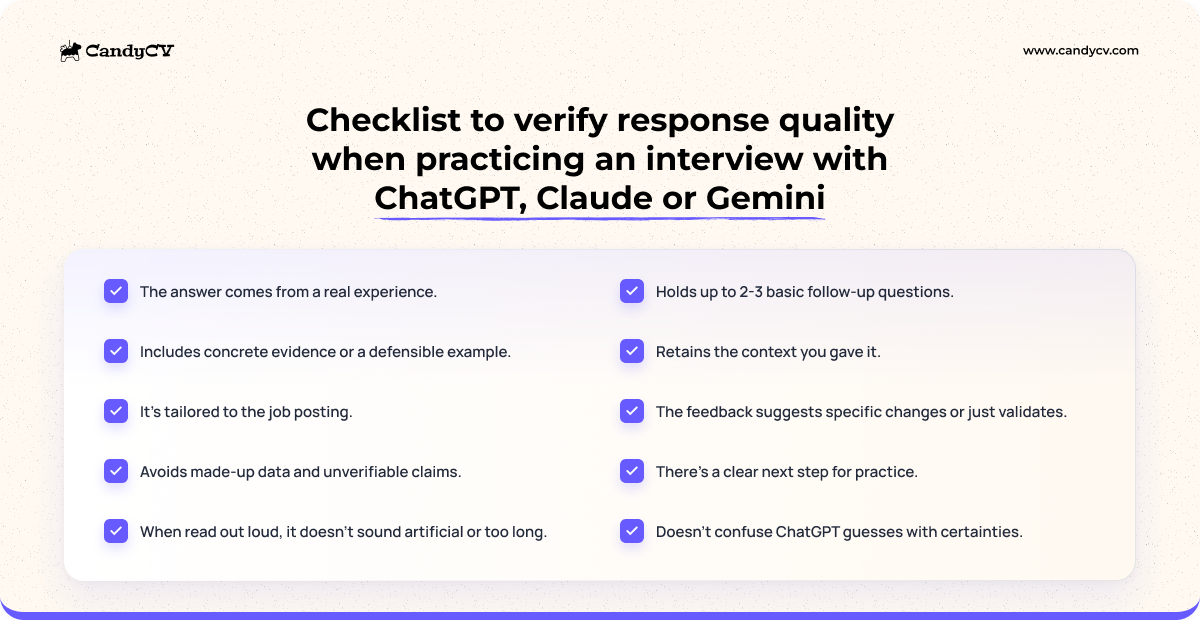
The output is useful if it leaves you better prepared to explain your background and what you can contribute. Before adding a question, answer, feedback note or follow-up question to your preparation, run it through this check.
| Criterion | Useful if… | Not useful if… |
|---|---|---|
| Experience | The answer comes from something that happened and you can explain it with details. | You can only support it with invented or overly broad phrases. |
| Evidence | It includes an example, decision, outcome, learning or defensible context. | It only lists skills: “I’m resourceful,” “I’m a strong leader,” “I adapt quickly.” |
| Fit with the job posting | The answer connects with a visible signal in the role. | It could be used unchanged in any interview. |
| No invention | The AI does not add metrics, achievements, titles or responsibilities you did not provide. | It decorates your experience until it changes it. |
| Natural voice | You can say it out loud without sounding like you are reading or borrowing someone else’s voice. | The answer looks correct, but it does not sound like you. |
| Length | It has one clear central idea and gets to the example without taking too long. | It circles around, piles on context or tries to cover everything. |
| Follow-ups | It can handle 2 or 3 basic questions about evidence, decisions or outcomes. | It falls apart as soon as someone asks, “What exactly did you do?” |
| Feedback | The comment suggests specific, prioritized changes. | It only validates, scores or rewrites without explaining the problem. |
| Next step | You know what to correct, practice or check next. | You end up with a prettier version, but no plan. |
Not every answer needs to be perfect. The minimum is that it is true, relevant, specific and defensible. If the checklist keeps failing on evidence, go back to your examples. If it fails on one specific question, work on that question separately. If it fails on pace, pressure or naturalness, general-purpose AI is probably no longer the best place to continue.
When to stop asking ChatGPT for more prompts and switch methods
Stop asking for more prompts when ChatGPT, Claude or Gemini is no longer helping you decide what to improve. If each round produces a slightly more polished version, but you still do not know what evidence is missing, what pattern repeats or how you would answer out loud, the iteration has turned into noise.
That limit does not mean ChatGPT is useless. It means it has already done its job: organize, generate hypotheses, review a draft or stress-test an answer in a basic way. From there, you need a different kind of practice.
| Signal | What may be happening | More useful next method |
|---|---|---|
| The questions are predictable or too gentle. | ChatGPT, Claude or Gemini is not increasing difficulty or reacting well to your answers. | Practice with a more guided experience or ask for external feedback. |
| The feedback does not specify changes. | You are receiving validation, not diagnosis. | Ask for human/specialized review or use practice with more structured feedback. |
| Your answers sound well written, but not like you. | You have optimized style over authenticity. | Rewrite in your voice and practice out loud without reading. |
| You cannot defend a basic follow-up. | Evidence, own action or outcome is missing. | Go back to the real experience before polishing further. |
| You repeat the same problem across several answers. | You need to detect a pattern, not correct one isolated phrase. | Practice in sessions that compare answers and turn failures into actions. |
| One specific question blocks you. | The problem is not ChatGPT; it is understanding what that question may assess and what boundary you need to set. | Work on that question separately before simulating. |
| You do not have the job posting, examples or fit signals organized. | The base preparation is missing. | Go back to organizing the job posting, examples and fit signals before practicing. |
| You need to train pace, pressure, listening or naturalness. | Written chat is too limited as a practice environment. | Answer out loud, record yourself or use a more designed practice experience. |
If what you are missing is a full conversation and a way to spot patterns across several answers, you can move from chat to a voice-based mock interview tailored to your resume and the job posting. The report does not replace your judgment or predict the company's decision, but it can show which answers lose clarity, evidence or connection to the role so you know what to work on next.
General-purpose AI is useful for hypotheses, structure and basic review. It stops being useful when what is missing is base preparation, evidence, oral practice, consistent feedback or diagnosis of patterns.
Switching methods does not guarantee the interview will go well, but it reduces the risk of confusing many rounds of ChatGPT with effective preparation. Preparing for an interview is not about producing more text. It is about arriving with your own answers, defensible evidence and enough practice to explain them without depending on the chat.