How to check if your resume is ATS-friendly in a realistic way

Checking whether your resume is ATS-friendly means checking whether the document enters an ATS or job application portal with a structure that is clear enough for the content to be read, stay organized, and turn into usable information inside the system. It is not something you can measure with a generic tool that gives your resume a score.
In this guide, you will see:
- What it really means to check the technical compatibility of a resume, and what that check cannot tell you.
- A 5-test method you can run yourself.
- How to spot what kind of technical problem your resume actually has.
- What to do next based on the pattern you get from the tests.
If what you want is a practical way to review your current resume, keep reading.
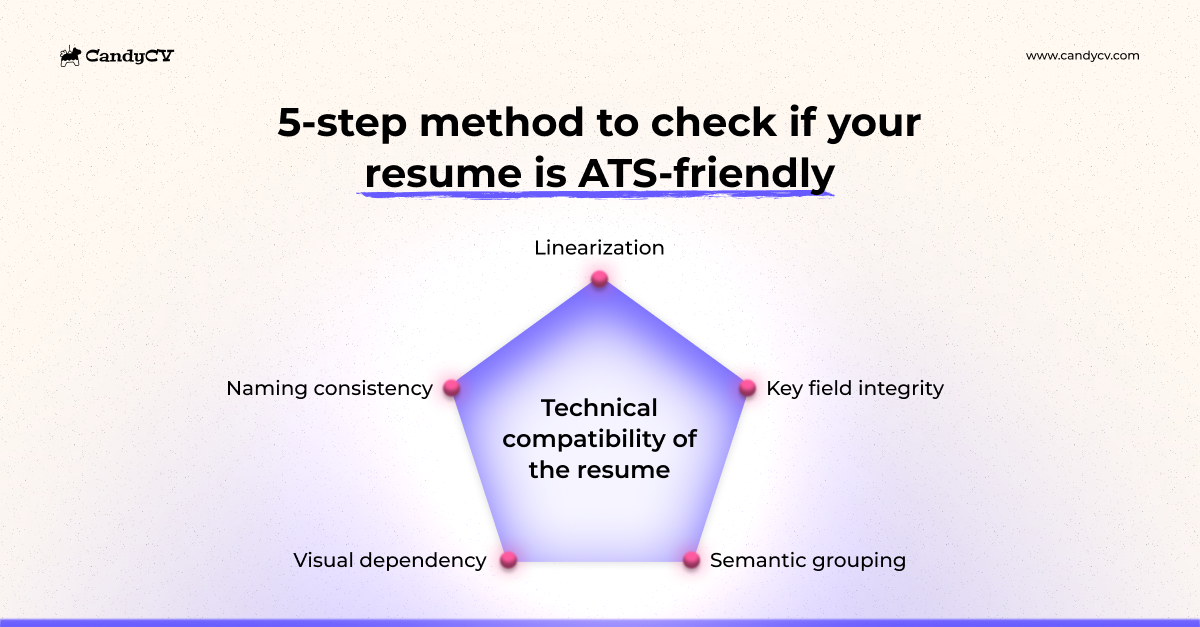
This is a summary of the five tests used in the CandyCV method:
What you are actually checking when you test an ATS-friendly resume
When you upload a resume to a job application, the system is not working with the document the way you see it. These systems are designed to extract text, separate blocks such as work experience or education, recognize data such as dates, skills, and job titles, and convert some of that information into a more structured candidate profile. That is how major ATS platforms themselves describe the process (see Workday or Greenhouse).
That is why checking whether a resume is ATS-friendly is not about guessing whether “the ATS will reject you.” It is about checking whether your information enters the system in a form the system can actually work with.
That is the focus of this article: checking the technical compatibility of your resume.
How to test whether your resume is ATS-friendly: a 5-step method
You don’t need a vague scoring tool to verify your resume’s quality. Most “ATS checkers” oversimplify a complex process, offering false validation in exchange for your personal data or money. There are far more effective criteria you can apply yourself.
This five-test method is a practical way to spot whether the document is robust or whether it has fragile points worth fixing. Here is the logic behind each test, and then we will go through them one by one:
- Linearization: whether the resume keeps a logical reading order when the design disappears.
- Semantic grouping: whether each block keeps its pieces together and its boundaries stay clear.
- Key field integrity: whether name, target role, dates, skills, languages, and location are easy to detect and categorize.
- Visual dependency: whether the resume still works through text and structure, not just through layout.
- Naming consistency: whether job titles, tools, skills, certifications, and other entities are named in a stable, recognizable way.
Test 1: reading order and linearization
The first test checks whether your resume handles reading order well. It is not enough that “the text can be copied.” You need to check whether, once the layout disappears, the content still has a logical flow and can be read without having to reconstruct what belongs to what.
That is what linearization means: the moment the document stops relying on columns, boxes, font sizes, or visual position and is reduced to sequential text.
How to run the linearization test
- Open the resume you are actually using to apply.
- Pull the content out of the design. The simplest way is to select all the text and paste it into a plain-text editor.
- Read it from top to bottom as if the system could only see sequential text.
- Check whether the reading order still makes sense or whether blocks start blending into each other.
- Pay special attention to whether:
- your name and contact details stay at the top instead of slipping into other sections.
- your professional headline stays attached to the header.
- a work experience entry gets split or mixed with sidebar content if you use multiple columns.
- skills, languages, or certifications end up dropped into the middle of work experience or education.
- section headings still precede the right content.
| What you’re reviewing | Good sign | Bad sign |
|---|---|---|
| Overall reading order | The resume content follows a clear, logical top-to-bottom flow | Parts of one section get mixed into the middle of another |
| Sequence between sections | It is easy to understand which section comes next | A section seems to end, but then continues several lines later |
| Content continuity | The reading flow moves forward without strange jumps or confusing interruptions | The text forces the reader to mentally jump between areas to piece the content together |
What a failed result usually means
If this test goes badly, your resume is probably not working as an interpretable document. The problem often points to the template you chose, and sometimes to the tool you used to build it. Do not jump to conclusions yet, though. Keep going. The point is not to panic over one weak signal, but to see the overall pattern.
What this test cannot tell you
This test does not guarantee that key fields will be categorized correctly once they enter a system. A resume can linearize reasonably well and still have problems with semantic grouping or with the clarity of important fields.
Test 2: semantic grouping and section recognition
The second test checks whether your resume handles internal coherence, semantic grouping, and section recognition well. At this point, the question is no longer whether the document can be read in sequence, but whether the pieces that should be understood together actually stay together, and whether it is still obvious what belongs to each section.
That matters because an ATS or application portal does not just need to read text. It also needs to interpret a work experience entry as a complete unit, an education entry as a complete unit, and a skill plus its level as part of the same piece of information.
How to run the semantic grouping test
Repeat the previous exercise, but this time pay less attention to the overall flow and more attention to the internal cohesion of each block.
- Look at each work experience entry as a closed unit.
- Ask whether it is immediately clear:
- What the role was.
- Which employer it was at.
- What the dates were.
- Which description belongs to that experience.
- Do the same for education, skills, languages, certifications, and any other section on the resume.
- Check not just whether the pieces stay together, but whether it is clear that they belong to that category and not another one.
- Watch for any piece of information that seems to have become detached from the block it belongs to, or that could be read as part of the previous or next section.
| What you’re reviewing | Good sign | Bad sign |
|---|---|---|
| Cohesion within each work entry | Job title, company, dates, and description read as one clear unit | The dates get separated from the role, the company looks like something else, or the entry forces the reader to reconstruct the relationships |
| Cohesion within each education entry | Degree, institution, and dates appear together and are easy to understand | Part of the information feels disconnected, or it is hard to tell which detail belongs to that education entry |
| Skills, languages, or certifications | They appear as identifiable items with enough context | They end up as floating text, stray lines, or ambiguous details with no clear unit |
| Level or category tied to a detail | It is clear which skill, language, or certification the level refers to | The level is shown, but it is not clear what it is actually describing |
| Section boundaries | It is clear where each section starts and ends | Some information seems to hang under the wrong section, or it is not clear where one ends and the next begins |
| Function of headings | The headings clearly define what content belongs under each section | The headings are there, but they do not help separate categories or show what belongs to each one |
What a failed result usually means
If this test also fails, the problem is often in how the information units themselves are built, not just in the overall reading order. Before you start tweaking individual words, look at how your work experience, education, skills, and language sections are constructed.
If the issue comes from a layout that separates data that should stay together, or mixes categories that should be clearly separated, change the template first: ATS-friendly resume templates.
Test 3: key field integrity and parseability
The third test checks whether your key fields are intact and easy to parse. The question here is: even if the resume has a reasonable flow and the sections are more or less coherent, do the pieces of information that ATS platforms and job portals often reuse appear clearly, consistently, and in a way that is easy to categorize?
How to test whether your key resume fields are clear
- Go through the resume looking only at the data a system might want to turn into fields in a candidate profile. Focus especially on name, target role or headline, work experience (job title, employer, dates), education or certifications (title, institution, dates), skills, tools, languages and location.
- Check whether those data points are written as text, rather than represented by design elements. For example, do not rely on logos to identify employers or on graphics to represent skills.
- Check whether the formats are consistent and easy to interpret.
- Ask, for each field, whether a person or a system could quickly identify:
- What the data point is.
- Where it starts.
- Where it ends.
- Which block or category it belongs to.
| Key field | Good sign | Bad sign |
|---|---|---|
| Name | It is picked up quickly and does not compete with nearby information | It gets mixed in with the headline, contact details, or several nearby lines |
| Current job title and previous roles | They are picked up quickly and understood right away | They are buried in text or easy to miss |
| Dates | They follow a consistent format throughout the resume | They use different formats, or they are placed too close to other important fields |
| Skills, tools or certifications | They appear as recognizable text, including the associated level when relevant | They rely on icons, bars, or graphic layout to be understood |
| Languages and location | They are clearly distinguishable | They are buried inside dense or ambiguous blocks |
What this test cannot tell you
This test does not guarantee that the resume is structurally strong overall, or that each section preserves good internal coherence. You can have relatively clear fields and still have a fragile document when it comes to reading order or semantic grouping.
What a failed result usually means
If this test fails, it usually means the way you are presenting important data is making it harder to detect and categorize. Sometimes that comes from the template. Other times it comes from how you handled those sections inside the format you chose.
Start here:
- Clean up how key data is presented.
- Standardize formats, especially dates.
- Separate fields that should be distinct, such as job title and employer.
Test 4: visual dependency
The fourth test checks whether your resume depends too much on visual design. Here you are not looking at one field, but at something more global: does the document make sense because of what it says, or because the design is carrying too much of the structure and meaning?
That difference matters. A resume can look very clear in its original layout and still become fragile as soon as it loses columns, boxes, icons, color, or visual distribution. When that happens, the problem is not that design exists. The problem is that design is doing work that should have been handled more clearly by the text and the structure.
How to test whether your resume relies too much on design
Read the resume while trying to ignore the visual support as much as possible.
- Check whether the document would still make sense if colors, floating text boxes, graphics, timelines, and layout tricks disappeared.
- Ask whether the information hierarchy would still be clear without needing to “see where things are.”
- Check whether you rely too much on visual position to understand:
- Which section is primary and which is secondary.
- What belongs to what.
- Which parts are actual content and which are just visual support.
- Pay special attention to whether:
- icons replace words that should be written out.
- bars or scales represent skills or languages without explaining them in text.
- a timeline is functioning as structure because the text does not hold up on its own.
- color, size, or layout is what is really separating categories.
| What you’re reviewing | Good sign | Bad sign |
|---|---|---|
| Resume hierarchy | The resume still has a clear, understandable structure based on the content itself, meaning the text and its order, even if most of the visual support is removed | Without the design, the resume loses a lot of clarity at once. This is common in creative templates from Canva and other tools that are not specialized for resumes |
| Visual support | It supports the reading flow without replacing important content | It replaces meaning that should be expressed in text |
| Overall composition | It makes the resume easier to read, but it is not essential to understanding what is happening in the document | The difference between primary and secondary sections depends more on design than on textual hierarchy |
What this test cannot tell you
This test does not mean design is automatically a problem, or that a plain-looking resume is always better. It does not reward ugly formatting or punish visual formatting. It simply checks whether the architecture of the document is robust on its own.
What a failed result usually means
If this test fails, the design is doing work that should be handled better by the content and its organization. Before changing anything, ask yourself this: what is the design solving that the content should solve more clearly? If the answer is “quite a lot,” the problem is not a small detail. It is the underlying document architecture.
A note for US English readers: this is also where photo-heavy resume formats often create noise. In the US, photos are usually not appropriate on resumes, so a design built around a headshot is generally the wrong default.
Test 5: naming consistency and entity normalization
The fifth test checks whether your resume is consistent in how it names things. At this point, you are no longer looking at layout or section structure, but at something more subtle: whether you are naming the same things consistently enough that both systems and humans can recognize them as the same entity.
If you name the same thing three different ways with no clear logic, that signal gets fragmented.
How to test naming consistency across your resume
Read the resume looking only for repeated or equivalent terms, abbreviations, and acronyms.
- Review how you refer to your job titles across the document.
- Check whether the same skill, tool, or technology always appears in a stable form, or whether the variants make it look like different things.
- Check whether certifications, languages, employers, degrees, or methodologies are named consistently.
- Watch for cases where you alternate between English, another language, acronyms, abbreviations, and full names without making the equivalence clear.
- Ask whether a non-expert reader would understand that you are talking about the same thing every time.
Typical weak patterns include these examples:
- The same role appears as “Project Manager,” “PM,” and “Project Lead” with no clear reason.
- The same tool appears as “Google Analytics,” “GA4,” and “Analytics 4”.
- A certification appears once in full and elsewhere only as initials.
- A company or university is written in full in one place and abbreviated in another with no explanation.
- You switch between languages for key terms without a clear logic.
What this test cannot tell you
This is not about forcing you to use exactly one word every time or flattening the language. The goal is not to sound repetitive. The goal is to avoid fragmenting an important signal through chaotic, ambiguous, or weakly comparable variants.
What a failed result usually means
If this test fails, the problem is usually naming inconsistency. The resume may be reasonably well built and still send messy or diluted signals that are harder to recognize as the same thing.
Start here:
- Choose one main form for naming repeated job titles, tools, skills, certifications, and other entities.
- Keep the logic stable throughout the document.
- Use equivalents only when they add clarity, not when they add noise.
- If you mix languages and acronyms, make the equivalence clear.
If, when you try to clean up that naming, you realize the problem is no longer just technical but also about how your role fit is presented, the next step is no longer formatting but content. In this guide you can learn how to write an effective resume.
What to do based on your test results: analysis and next steps
One isolated signal is not enough to draw a good conclusion. What tells you something useful is the pattern that appears when you combine several tests. You can have one weak signal without the document being badly built. The opposite is also true: several medium-strength problems can add up to a clear structural weakness even if none of them looks dramatic on its own.
That is why most online ATS checkers are not a substitute for this kind of analysis. They tend to collapse different issues into one score: formatting, keywords, generic writing advice and technical structure. This 5-step method is more useful because it helps you identify what kind of weakness your resume actually has.
| Overall diagnosis | What is usually happening | What to do now | Next step |
|---|---|---|---|
| Structural fragility in the document | Several signals related to linear reading order, block cohesion, and parseability are breaking down | Review the overall structure before adjusting minor details | Continue with this article |
| Key information is not well resolved | The resume holds up overall, but the name, job title, dates, skills, or languages are still ambiguous or not presented cleanly | Clean up and standardize how you present important information | Continue with this article |
| Excessive dependence on design | The document relies too heavily on its visual layout to be understood properly | Move that clarity into the text, hierarchy, and a more robust structure | Choose an ATS-friendly resume template |
| Reasonable technical compatibility, but weak performance | The resume passes the tests, but still does not perform well in real hiring processes | Improve clarity, value, and alignment with the role | Learn how to write effective resume content and, once that’s done, how to tailor it to a job posting |
Diagnosis 1: your resume has high structural fragility
This diagnosis usually appears when you accumulate bad signals in:
- Linearization.
- Semantic grouping of sections and related data.
- Key field integrity and parseability.
Taken together, that usually means the resume is not strong enough as a document. It is not just that a date format looks messy or one section could be cleaner. It means the overall structure forces too much reconstruction, mixes relationships that should be obvious, or falls apart once the design loses weight.
How to fix structural fragility
- Do not start by tweaking individual words.
- Review the overall resume structure first.
- Simplify how work experience, education, skills, and languages are organized.
- Make sure the document can be read and understood clearly without relying on mental reconstruction.
Diagnosis 2: your overall structure holds up, but key fields are poorly exposed
This diagnosis usually appears when the reading order and section cohesion are not terrible, but the weak signals are concentrated in key field clarity and parseability.
Here the problem is often localized. The fields that systems commonly use to build a candidate profile are not presented in a clean, consistent, easy-to-categorize way.
How to fix badly presented key fields
- Clean up how key data is shown.
- Standardize formats, especially dates.
- Improve the hierarchy between your name, target role, dates, skills, languages, and location.
- Separate important fields more clearly instead of cramming them onto the same line.
At this stage, you may not need to rebuild the whole resume. Often the problem is how the important information is presented, not the entire structure. If it feels difficult to adjust the design of templates in Canva or Word, upload your current resume to CandyCV and choose an ATS-friendly template that is easy to edit.
Diagnosis 3: the design is carrying too much meaning
This diagnosis usually appears when visual dependency and semantic grouping both show problems, especially if there are also signs of structural fragility or unclear fields. In that case, the issue is not simply “the design,” and it is not solved by replacing the template with something plain and lifeless.
How to move meaning back into the text
- Identify which parts of the meaning are currently being carried by the design.
- Move that clarity into text hierarchy, explicit section structure, and more visible relationships.
- Do not assume that “exporting it better” will fix a weak underlying document architecture.
Diagnosis 4: the resume seems technically solid, but it still is not performing
This is an important case. If the tests look reasonably good overall, obsessing further about ATS is probably not where the real gain is. At that point, the problem is more likely to be in the effectiveness layer of the resume, rather than technical compatibility:
- The content is too generic.
- Your fit for the role is not clearly explained.
- The resume is not tailored enough to the kind of role you are applying for.
- The experience may be valid, but it is not framed clearly enough.
If this is the case, the next step is no longer technical:
- Review how you explain your experience, achievements, skills, and specialization.
- Check whether the resume makes it obvious why you fit the role.
- For high-priority applications, tailor the resume more directly to the job posting.
- To improve how the resume communicates value.
- To tailor it better to a specific job posting.
Frequently asked questions about checking whether a resume is ATS-friendly
If I can copy and paste the text from my resume, can I assume it is ATS-friendly?
No. Being able to copy the text is a good sign, but it only tells you part of the story. A resume can allow copy and paste and still have important problems:
- The reading order can break.
- Work experience and dates can become detached from each other.
- Skills, languages, or certifications can appear as text but still be ambiguous.
- The document can rely too much on visual design to make sense.
That is why this guide uses five tests, not one. The useful question is not whether “there is text,” but whether the resume keeps an interpretable structure once it enters an ATS.
Are ATS resume checkers actually useful?
They can be mildly useful as a rough signal, but not as a real validation of technical compatibility. The problem with most ATS checkers is that they simplify too much. They often roll different things into one score:
- Technical compatibility
- Overall resume quality.
- Presence of certain keywords.
- Generic writing advice.
That makes the final score less meaningful than it looks. It also means the tool’s incentive is often to keep you inside its product, not to help you understand the exact technical weakness in your resume. This method is more useful because it breaks the problem apart: reading order, semantic grouping, key field clarity, visual dependency, and naming consistency.
If the checker is part of a resume builder, evaluate the product itself too: this method explains how to choose a good resume builder without falling for vague ATS claims.
Is PDF always a good format for ATS?
Not by itself. PDF is not automatically the problem or the solution. What matters is how that PDF is built. There are perfectly workable PDF resumes, and there are fragile ones. So do not assume, “It is a PDF, so it must be fine.” File format matters less than document construction.
Can a resume be ATS-friendly and still not get interviews?
Yes, absolutely. This is one of the most common points of confusion. A resume can be technically ATS-friendly and still perform badly for other reasons:
- It is too generic.
- It does not make your fit clear.
- It is not tailored to the kind of role you want.
- The experience is valid, but it is explained weakly.
Technical compatibility only solves one layer: making sure the document enters ATS and application portals in a reasonably robust form. You still need the second layer: effectiveness. The resume has to communicate value and make your fit easy to detect.
If your tests look reasonably good but the resume still is not working, the next step is learning how to write effective resume content or how to tailor your resume to a job posting.
What should I do if several tests are only mediocre, but none of them is a disaster?
That is a much more common scenario than “everything is broken.” When several tests come back mediocre at the same time, there may not be one dramatic failure, but there is usually an accumulated fragility. And that matters, because in ATS and application portals, small weaknesses tend to stack.
In that case, do not start by fixing isolated micro-details. It is usually smarter to review the resume in layers:
- Overall structure.
- Section cohesion.
- Clarity of key fields.
- Naming consistency and minor details.
If that accumulated fragility comes from the base format, fix the structure before you touch the content: ATS-friendly resume templates.