Best resume builders: analysis and comparison

The internet is full of resume builders. Far fewer help you create a resume that is clear, well-structured, easy to update, and genuinely useful in modern hiring processes.
After reviewing well-known options using the four criteria from our resume builder evaluation method, the three strongest choices are:
- CandyCV: the most balanced option for creating an ATS-friendly resume that is well-structured, easy to edit, and easy to tailor.
- FlowCV: a clean, transparent freemium resume builder that works well if you already know what you want to say.
- Enhancv: a more visual resume builder with built-in AI features and strong customization, but with trade-offs worth understanding before you choose it.
This comparison looks at what each tool does well, where it falls short, and which differences actually matter when your resume needs to work for both recruiting technology and the people reading it.
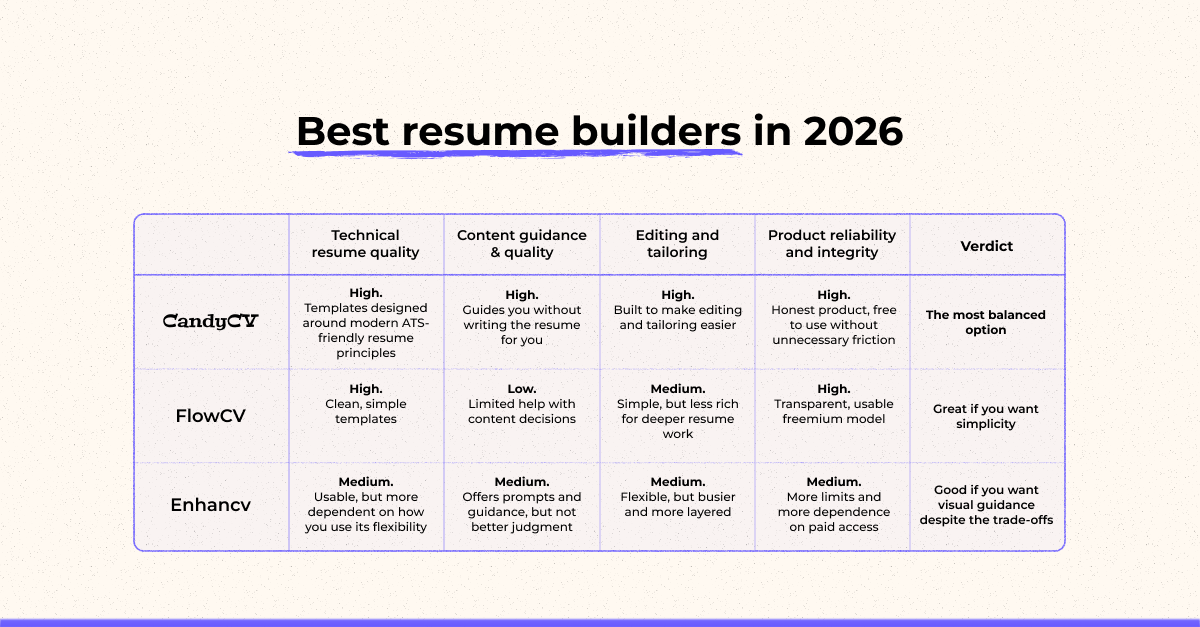
| Criterion | CandyCV | FlowCV | Enhancv |
|---|---|---|---|
| Technical resume quality | High. Templates designed around modern ATS-friendly resume principles | High. Clean, simple templates | Medium. Usable, but more dependent on how you use its flexibility |
| Content guidance and positioning | High. Guides you without writing the resume for you | Low. Limited help with content decisions | Medium. Offers more prompts and guidance, but not always better judgment |
| Editing, maintenance, and tailoring | High. Built to make editing and tailoring easier | Medium. Simple, but less rich for deeper resume work | Medium. Flexible, but busier and more layered |
| Product reliability and integrity | High. Free to use without unnecessary friction or artificial download traps | High. Transparent, usable freemium model | Medium. More limits and more dependence on paid access |
| Verdict | The most balanced option | Great if you want simplicity | Good if you want visual guidance and accept more trade-offs |
If you want to understand the broader resume-building tools market, start with our guide to resume-building tools: types, pros and cons of each.
How these resume builders were selected
This is not a sponsored ranking or a list copied from whatever happens to show up in search results. It is closer to the opposite.
I evaluated these tools using the same framework explained in our method for choosing a good resume builder. The four criteria are:
- Technical resume quality (what makes it really ATS-friendly).
- Content quality and candidate positioning.
- Editing, maintenance, and tailoring.
- Product reliability and integrity.
Only tools that pass a quality threshold across all four criteria made the list. A critical failure in one area, or several important limitations combined, was enough to exclude a tool.
That is why many popular options are not in the top three. Some have serious product integrity issues: hidden charges, restricted exports, unclear free plans, or a gap between what is advertised and what the user actually gets. Others do little beyond formatting, leaving almost all strategic resume decisions to the user. That includes tools like Word or Canva, which can be useful in specific situations but have important limits as resume builders. Others lean too heavily on generic AI-generated content that may make the resume longer, but not necessarily better.
CandyCV: the most balanced resume builder for ATS-friendly, easy-to-edit resumes
CandyCV stands out because it is not just a tool for formatting a resume. It is designed to help you create a resume that is well-structured, technically usable, and easy to tailor without needing to understand design or recruiting technology first.
That combination is what separates it from many better-known resume builders.
CandyCV was built from direct experience developing an applicant tracking system used by tens of thousands of companies. That background shows in how the templates are structured, how the information is organized, and which resume decisions the tool helps you make.
Its free model is also genuinely functional: you can create, edit, and download unlimited resume versions as PDFs without forced subscriptions or artificial blocks at the end of the process.
CandyCV is the only option in this list that combines strong technical resume structure with an excellent editing experience that does not require prior knowledge of design or ATS behavior.
| Criterion | Rating | What it means |
|---|---|---|
| Technical resume quality | Strong | Built to produce structured resumes for modern hiring processes, not just visually attractive documents. |
| Content quality and positioning | Good | It does not write the resume for you, but it guides each section so you can make better decisions about what to include and how to frame it. |
| Editing, maintenance, and tailoring | Strong | The design adapts to the content, so you do not have to constantly move elements around or fight the formatting. |
| Product reliability and integrity | Strong | Transparent access and a robust free experience with unlimited PDF downloads. |
What CandyCV does especially well
The most valuable thing about CandyCV is that it eliminates two problems that often appear together: a poorly thought-out resume and an editor that becomes painful to maintain.
First, the templates do not start from a purely visual logic. They are based on how resume information needs to be structured so the document can work well for both systems and people. For more detail, see our guide to what actually makes a resume ATS-friendly.
Second, the editing experience is built around a simple principle: the content leads, and the design adapts. That makes it much easier to correct, update, duplicate, and tailor resume versions without breaking the layout every time, which is a common frustration with Word or Canva.
CandyCV also does not build its value proposition around promising that AI will write your resume for you. Instead of filling your resume with generic phrases, it gives you context and guidance inside each section so you can make better decisions. That is less flashy as a marketing claim, but much more useful if you care about the quality of the final resume, not just its appearance.
What to keep in mind before choosing it
CandyCV helps most if you want to work on your resume properly. It is not the best fit if you expect a tool to “do it all” almost automatically.
If you want a highly automated experience, CandyCV may feel less instant than tools built around AI prompts or more invasive assistants. That is not necessarily a weakness, but it is a real difference.
Its template customization is also intentionally limited to the options offered inside the product. Those options are designed to support ATS-friendly resumes, so this helps prevent common mistakes. But if your priority is complete design freedom, as in Canva, CandyCV is not the right choice.
Finally, part of CandyCV’s value comes from the ecosystem around the tool: guides, methods, and editorial judgment that help you make better resume decisions. If you ignore that and simply want to fill in a template as quickly as possible, you will not get the full value from it.
FlowCV: a clean and reliable resume builder if you already know what to say
FlowCV earns its place in this comparison because it does something many resume builders promise but few actually deliver: it lets you create a clean, professional, usable resume without pushing you into product traps or an unnecessarily complicated experience.
Its main strength is not that it does more. Its strength is that it does the basics well: minimalist templates, a simple user experience, and a fairly honest freemium model with no watermark or hidden charge for basic use.
| Criterion | Rating | What it means |
|---|---|---|
| Technical resume quality | Strong | Its templates are clean, minimal, and focused on readability and structure. |
| Content quality and positioning | Limited | It gives you a reasonable structure and step-by-step guidance, but little editorial support on what to say or how to prioritize it. |
| Editing, maintenance, and tailoring | Good | The experience is simple and usable, but more structured and less flexible if you want to iterate heavily or work deeply on the content. |
| Product reliability and integrity | Strong | Offers a free plan with unlimited PDF export and no download tricks. |
What it does especially well
The best thing about FlowCV is that it reduces friction for people who already have a reasonable idea of what they want to say and simply need a tool that does not get in the way.
That matters in a market full of builders that turn resume creation into a sequence of blocks, paywalls, subscriptions, and inflated promises. Like CandyCV, FlowCV leans more toward product honesty and makes the first free use genuinely functional.
Its templates also tend to be sober and easy to read. They provide a solid basis for creating an ATS-friendly resume, especially compared with more visual or overloaded options. If you want a simple, professional resume without spending time on design, FlowCV is a strong candidate.
What to keep in mind before choosing it
FlowCV’s main limitation is that it gives you less help thinking through the content.
You can build a correct resume inside FlowCV, but the tool does not support the strategic side as much: focus, prioritization, wording, or editorial judgment. If you arrive with questions about what to include, how to summarize your experience, or which signals are worth highlighting, FlowCV offers less than a tool designed to help you make those decisions.
The interface is intuitive, but one drawback is that you build the resume by filling out form fields rather than editing directly on the resume. That can make creation and editing feel a bit less immediate. I would not call it clumsy, but it is less rich as a resume workspace than the other finalists.
Enhancv: a flexible resume builder with AI features and visual customization
Enhancv is included in this comparison because it offers something the other two tools do not prioritize in the same way: more templates, more visual customization, and AI features built directly into the editor.
The trade-off is that those extras come with costs. Access is more limited, the free experience is narrower, and part of the value it promises, especially around AI, depends on whether you already know how to give the tool strong content to work with.
| Criterion | Rating | What it means |
|---|---|---|
| Technical resume quality | Limited | Not all templates are equally ATS-friendly. |
| Content quality and positioning | Limited | Built-in AI, feedback, and prompts can help you move forward, but they do not automatically guarantee better judgment or a better final resume. |
| Editing, maintenance, and tailoring | Strong | Offers many templates, sections, customization options, and a polished editing experience. |
| Product reliability and integrity | Good | Although it is paid and free access works more like a trial, the conditions are presented clearly. |
What it does especially well
Enhancv makes it easy to get started and feel guided through the process. It offers many templates, visual options, integrated suggestions, and an interface designed to help you review and improve your resume while you work on it.
User reviews often praise its ease of use, polished visual results, and the usefulness of prompts or suggestions. For someone who wants more visual control and appreciates a guided editor, this can be genuinely valuable.
What to keep in mind before choosing it
Enhancv’s first limitation is that the initial free access works more like a window into paid features. That is not automatically a problem, but it matters if you are looking for a truly free resume builder.
The second limitation is that part of its value depends on AI, automatic feedback, and built-in prompts. Those can help you make progress, but they are not the same as strong editorial judgment. Some users find them useful. Others may end up with content that feels polished on the surface but not much more precise.
The third limitation is template choice. Enhancv does offer templates with ATS-friendly structures, but some of its more creative designs may be less suitable for standard online applications. In the US and many international hiring contexts, you should also be cautious with visual elements such as photos unless the industry or country clearly expects them. For most standard applications, clarity and structure matter more than visual novelty.
What about Canva, Word, AI resume writers, and other resume builders?
Many popular tools did not make this top three, not because they are useless, but because they solve a different problem or introduce trade-offs that matter when you are creating a resume for real hiring processes.
Word and Google Docs can work if you know how to structure a resume properly, know how to position your professional value, and want to use a simple layout. The problem is that they do not help much with resume strategy, and formatting can become fragile when you update, reorder, or tailor the document.
Canva is strong for design, but that is also the risk. It can produce attractive resumes, but attractive does not automatically mean ATS-friendly, easy to parse, or easy to adapt. Canva can be fine for specific creative use cases, but it is not the safest default for standard online applications.
AI resume writers can help you draft bullet points, summarize experience, or get unstuck. The problem is that they can also produce vague, inflated, or generic content if you do not give them strong evidence to work from. AI can support resume writing, but it should not replace judgment.
Other resume builders may be useful in specific contexts, but this comparison focuses on tools that perform well across the four criteria: technical quality, content support, editing experience, and product integrity.
And if you want a method to choose the right resume-building tool for you, check the guide to evaluating resume-building tools with professional criteria.
Which resume builder should you choose?
If I had to rank these three by overall balance, the order would be: CandyCV first, FlowCV second, Enhancv third.
None of them does everything perfectly. The difference is which trade-offs each one asks you to accept.
CandyCV is the most balanced because it combines the things that matter most in a resume: a strong technical foundation, an editing experience designed for maintaining and tailoring the document, real content guidance, and a transparent product model. It is not the flashiest promise, but it leaves fewer weak spots.
FlowCV comes second for a clear reason: it does less to help with content and positioning. It is clean, honest, and has a genuinely usable free experience, but the work of building a well-focused resume falls more heavily on you. If you already know what you want to say, that limitation matters less. If you do not, it matters a lot.
Enhancv comes third because of the combination of paid-access limits and an AI layer that does not always justify its promise. The editing experience is richer, and the process feels more guided, but that value comes with trade-offs the other two do not require.
The decision is simple:
Choose CandyCV if you want the option with the fewest weak spots and the strongest editorial logic behind it.Choose FlowCV if your resume content is already clear and you want a simple, clean, reliable builder. Choose Enhancv if you care most about visual customization, guided editing, and are comfortable paying for a more feature-heavy experience.
FAQs
What is the best free resume builder?
CandyCV and FlowCV are the strongest free options in this comparison, but for different reasons. CandyCV is better if you want more guidance and easier tailoring. FlowCV is better if you already know what to write and want a clean, simple resume builder.
Which resume builder is best for ATS-friendly resumes?
CandyCV is the strongest choice here because its templates and editing experience are built around structured, ATS-friendly resume principles. Its founder used to build a top tier ATS and has applied all the knowledge she acquired in CandyCV and the decisions that the tool makes for you. FlowCV is also a good option for clean, simple resumes. Enhancv can work, but you need to choose templates carefully and avoid overly visual layouts for standard online applications.
Is Canva a good resume builder?
Canva can be useful if you need a visually designed resume for a specific creative context, but it is not the safest default for standard job applications. The main risk is that a resume can look polished while being harder to parse, update, or tailor. For most online applications, structure and clarity matter more than visual decoration.
Are AI resume builders worth it?
AI resume builders can help you draft, rephrase, or get unstuck, but they do not automatically create a strong resume. If you give them weak or vague input, they often produce generic content. AI is useful as support, not as a replacement for clear positioning and strong evidence from your experience.
How should I choose a resume builder?
Choose a resume builder by looking beyond templates. Check whether it helps you create a technically usable resume, improve the content, edit and tailor versions easily, and access your final document without misleading payment traps. A beautiful template is not enough if the resume is hard to update or weak in content.