Tools to create a resume: types, differences, and what each one solves

There is no single best tool to create a resume. Search for that and you will find word processors, design tools, general-purpose AI tools, downloadable templates, and dedicated resume builders mixed together as if they were solving the same problem.
They are not.
The mistake is comparing them as if they were equivalent. Word, Canva, ChatGPT, and an online resume builder can all help you create a resume, but they work from very different assumptions. Some give you manual control. Some prioritize appearance. Some help generate text. Others are designed specifically for building a resume inside a structured environment.
In this guide, we are going to compare the main types of resume tools using four criteria that matter for an effective resume-building tool: technical usability, content quality and positioning; editing, maintenance and tailoring; and product integrity.
You will see:
- What types of tools exist for creating a resume.
- What each type usually does best.
- Where each one falls short.
- What mistakes to avoid before using one.
If you already have a few tools in mind and want to make a safe choice, read our guide on how to choose a good resume tool. It gives you the evaluation criteria and a quick method for comparing options.
What types of tools can you use to create a resume?
A resume tool is any environment you use to create, edit, format, improve, and/or export your resume. That umbrella includes very different options: Word, Google Docs, Canva, ChatGPT, downloadable templates, online resume builders, specialized resume editors, and more. But they do not all do the same job, and they do not help with the same part of the resume.
That is why it is useful to start by understanding what kind of help each tool gives you. In practice, most options fall into four main groups:
| Type of tool | What it is | Common examples | What to understand before using it |
|---|---|---|---|
| Word processors | General tools for writing and formatting documents. | Microsoft Word, Google Docs, Pages. | They give you control over the document, but they are not designed specifically for building resumes. Structure, order, clarity, and technical usability depend heavily on how you build the resume yourself. |
| Design tools | Visual platforms for creating attractive documents with templates, blocks, and graphic elements. | Canva, Figma, and other design editors. | They can help improve the look of your resume, but good appearance does not guarantee that the resume is clear, easy to edit, or technically usable in modern job applications. |
| General-purpose AI tools | Assistants that generate, summarize, or rewrite text based on instructions. | ChatGPT, Claude, and other AI chat tools. | They can help you get unstuck and improve wording, but they do not replace judgment about what to include, what to prioritize, or how to position your application. |
| Dedicated resume builders | Tools created specifically for resumes, usually with sections, templates, guided editing, and export options. | Online resume builders and specialized resume editors. | They can save time and provide more structure, but not all of them offer the same value. Some genuinely help you create a clear, editable resume. Others simply package templates, AI, or downloads behind unclear conditions. |
Before choosing a specific tool, identify which group it belongs to. That will tell you what it usually solves well, what it leaves in your hands, and what risks you should avoid.
Once you have narrowed down your options, this method can help you compare resume tools with better criteria.
What each type of resume tool solves and where it falls short
A resume tool can help a lot with one part of the process and leave you completely on your own in another. That is why it is not enough to ask whether a tool “works for creating a resume.” The more useful question is: what part of the resume does it actually improve, and what part only looks solved?
To compare the main types of resume tools with professional criteria, we will use four dimensions, as described in the method:
- Technical usability means recruiting technology, including applicant tracking systems (ATS) and job boards, can work with the resume reasonably well.
- Content quality and positioning means the tool helps you explain your experience better, avoid a generic resume, and show clearer relevance for the roles you are targeting.
- Editing, maintenance, and tailoring means you can update the resume, adjust it, and create versions without rebuilding the whole document every time.
- Product integrity means the tool is clear about what it offers and does not make you lose time, money, or judgment through confusing pricing, vague promises, poor exports, or misleading claims.
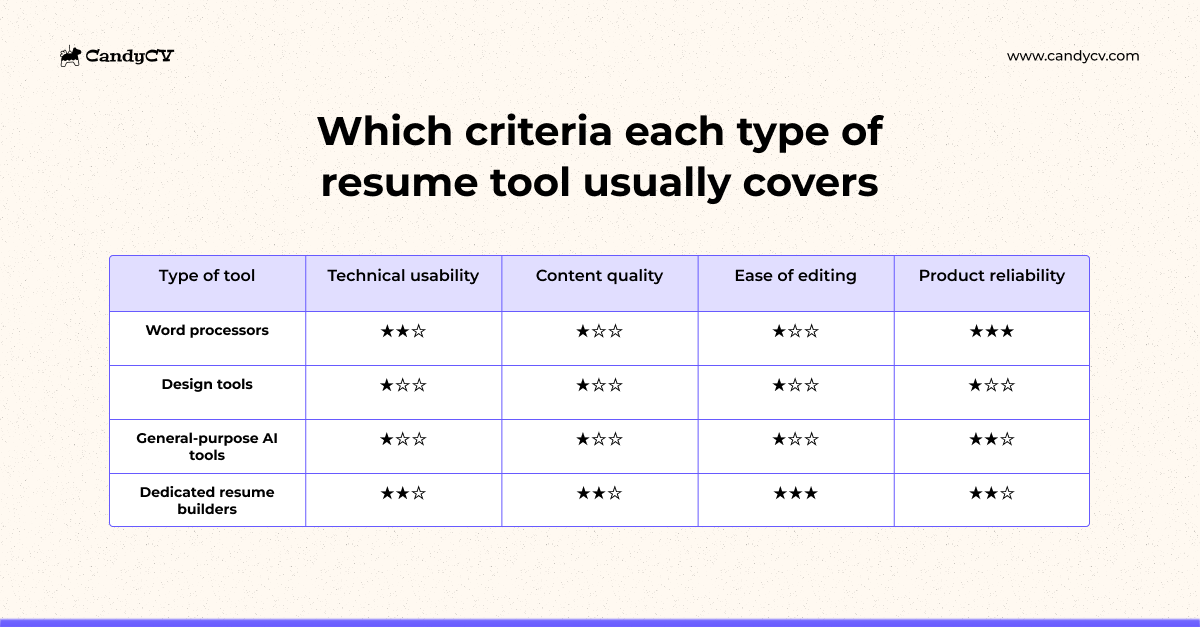
The ideal tool would perform well across all four. In practice, each type tends to be strong in some dimensions and weak in others:
| Type of tool | Technical usability | Content and positioning | Editing, maintenance, and tailoring | Product integrity |
|---|---|---|---|---|
| Word processors | ★★☆ It depends on you. If you know what attributes a technically usable resume needs, you can build it well. | ★☆☆ They do not help you decide what to include or how to prioritize it. | ★☆☆ Formatting can become painful. Layout often breaks when the text changes, and you can lose a lot of time fixing margins, spacing, and sections. | ★★★ They are usually clear tools. The risk is using them for a job they were not specifically designed to solve. |
| Design tools | ★☆☆ They can create attractive resumes, but they are not always designed for the recruiting technology that may process your application. | ★☆☆ They improve appearance, not necessarily the message, relevance, or professional clarity. | ★☆☆ Every change can affect the design, which makes it harder to maintain clean versions. | ★☆☆ They are useful for designing a template, but not as a complete resume solution. |
| General-purpose AI tools | ★☆☆ They do not guarantee that the final document will be technically usable. | ★☆☆ If you do not guide the tool well, provide context, and set criteria, it will often create a generic resume. | ★☆☆ They do not maintain a clean, editable, reusable version of your resume by themselves. | ★★☆ They can be useful, but it is easy to confuse fluent writing with quality. |
| Dedicated resume builders | ★★☆ They often make ATS-friendly templates easier to use, although technical quality varies a lot. Some tools use this as a marketing claim without fully supporting it in the product. | ★★☆ They can help with content, but you need to understand how they use AI and whether they actually help you position your application better. | ★★★ They usually make editing, tailoring, and versioning easier without breaking the resume every time you change the text. | ★★☆ This varies widely. There are serious resume builders, and there are products with unclear pricing, vague promises, or superficial AI. |
This does not mean one type of tool is always good or bad. It depends on what you need from it. That is why it is important to learn how to evaluate a resume tool before using it.
A word processor can be enough if you have judgment, patience, and you know how to check if your resume is ATS-friendly. But if every version becomes a fight with margins, page breaks, columns, and moving blocks, or if you are not clear on the technical attributes a resume needs, the tool is making you pay for its flexibility with your time. If you are considering using Word as your word processor, this guide on how to make a resume in Word with strategy can help you.
A design tool has a similar problem, although it can help you create a more polished-looking resume. The problem appears when design becomes the center of the process and clarity, editing, or technical usability moves into the background. A resume can look more professional without being better prepared to support your application.
A general-purpose AI tool can help when you do not know how to phrase an experience or when you need alternative wording. But generating text is not the same as building a strong resume. Without good context, AI tends to produce correct, fluent, generic sentences that are not clearly connected to your professional target.
A dedicated resume builder should help with all four criteria: technical usability, content and positioning, editing and tailoring, and product integrity. But this category also requires critical judgment. Just because a tool says it is made for resumes does not mean it truly helps with content, exports well, or explains its conditions clearly.
What risks to watch for depending on the resume tool you use
The basic mistake is choosing a tool with outdated criteria for a job application process that no longer works the way it used to.
Many people choose the first tool they find on Google, the tool they used years ago, or the option that looks fastest because, understandably, almost nobody enjoys making a resume. But a resume is now a more complex artifact than it used to be, especially with the expansion of online job boards, career sites, and recruiting technology in the hiring process.
If you want to go deeper into that technical side, read what an ATS is and how it affects your resume and job search.
These are the main risks that come with each type of resume tool:
| Type of tool | Common mistake when choosing it | What to watch for if you use it |
|---|---|---|
| Word processors | Choosing them out of habit, as if making a resume in Word or Google Docs were still the neutral default. The mistake is not using them at all. The mistake is assuming that a blank page or an old template is enough to solve structure, clarity, editing, and tailoring. Read why we do not recommend relying on Word resume templates. | Make sure the resume is not just written, but well structured, easy to edit, and technically usable. Even so, for many people, the recommendation is not to use word processors as the main environment for creating a resume. |
| Design tools | Choosing them for appearance, confusing a prettier resume with a more effective resume. The bias is thinking that a visually attractive template automatically improves readability, content, or usefulness in a job application. Read why Canva resume templates often fail. | Make sure design does not replace resume effectiveness. A visual template should not make the resume depend too heavily on graphic elements. In US-style resumes, photos are usually best avoided because they can introduce bias and are not expected in most standard applications. |
| General-purpose AI tools | Choosing them for speed and fluency, as if correct-sounding text were the same as a good resume. The risk is being persuaded by sentences that sound professional but do not prioritize your experience or differentiate your application. | Make sure AI is not just making your resume sound polished, but helping you think more clearly about what to include and why. To go deeper, read how to create your resume with ChatGPT in 5 steps. |
| Dedicated resume builders | Choosing them because they promise a complete solution, without distinguishing between a builder that genuinely helps with structure, editing, and content, and a tool that only packages templates, superficial AI, or unclear promises. | Make sure the tool is clear about pricing, limits, exports, and what it actually provides. If you want specific options, read our guide to the best resume builders. |
Each type of tool has a typical decision bias.
With word processors, the bias is habit. With design tools, it is aesthetics. With general-purpose AI, it is speed. With dedicated resume builders, it is the promise of a complete solution. But none of those criteria is enough on its own.
A tool can be useful and still not be enough for your case. The problem appears when you choose based on the most visible signal: design, speed, free access, popularity, or an AI promise, instead of looking at what the tool actually helps you solve.
Next step: where to go depending on your situation
Now that you have the general map, the next step depends on what you are trying to understand or fix. You do not need to read every guide. Start with the one that matches your current situation:
- If you have several tools in mind and want to evaluate them with professional criteria, read how to choose a good resume builder.
- If you want to compare dedicated resume builders using the four criteria, not as an empty brand ranking, read our guide to the best tools to create a resume.
- If your resume is currently in Word and you want to understand its limitations and alternatives, read our guide to the problems with Word resume templates and better alternatives.
- If your resume is in Canva and you want to check whether it is technically usable, use this method to check whether your resume is compatible with ATS and job boards.
- If you want to use general-purpose AI tools to help with your resume content, read how to create your resume with ChatGPT in 5 steps.
And if you want to go straight to a tool that meets the criteria and includes professional resume templates, start your resume in CandyCV.
Frequently asked questions about types of resume tools
What is the best tool to create a resume?
There is no best resume tool in the abstract. It depends on what you need to solve: the technical usability of the document, the content and positioning, editing and tailoring, or the reliability of the tool itself.
A word processor can work if you do not need a visual template and you understand what makes a resume ATS-friendly. A design tool can help if you are not applying mainly through online systems and you know how to protect readability. AI can help you with wording if you know how to guide it and avoid losing important signals in generic language. A dedicated resume builder, such as CandyCV, is usually the best option for someone who needs a more complete resume-building environment.
Is it better to make a resume in Word, Canva, with AI, or in a dedicated resume builder?
It depends on which part of the resume you need help with.
Word and Google Docs give you manual control, but they do not guide you. Canva can improve appearance, but it does not guarantee that the resume is clearer, easier to edit, or technically usable. AI can help you write or rewrite content, but it does not replace judgment about what to include or how to position your application.
A dedicated resume builder is usually a better starting point if you want to work inside an environment designed for this specific use case. But it still needs to be evaluated carefully. Not every resume builder offers the same level of structure, content help, tailoring, or transparency.
Are AI tools useful for creating a resume?
They can be useful, but not simply because they use AI.
An AI tool can help you get unstuck, rewrite bullet points, or improve the tone of your resume. The problem appears when it generates fluent but generic content that is poorly connected to your professional target or based on too little information.
AI is useful when it helps you think more clearly about your content, prioritize what matters, and review the focus of your resume. If it only produces sentences that sound professional, it can create the feeling of progress without actually improving your application.
Does an ATS-friendly resume builder guarantee that my resume will work?
No. A tool that promises an “ATS-friendly resume” does not guarantee that your resume will always be interpreted perfectly by every applicant tracking system.
Unfortunately, “ATS-friendly” is often used more as a marketing label than as a precise product promise. A tool may support some useful technical elements, such as a cleaner template or an exportable PDF, but technical usability also depends on the structure, reading order, sections, key fields, and how the content is built.
What matters is whether the tool explains what it takes care of and what it cannot promise, not whether it uses “ATS” as a sales hook.